Resources Menu
The Resources menu displays all resources currently loaded in the application.
Resources can be loaded in three ways:
- Dynamically during execution via OSC commands
- At startup, from the resource lists defined in the
settings.jsonconfiguration file - Using the ‘Add’ buttons in this menu of the user interface
The content of this menu is updated in real time as new resources are loaded.
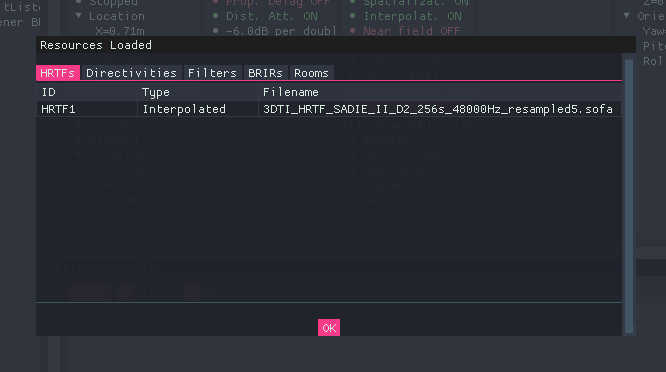
BeRTA Renderer - Resources menu
Resource Lists
Resources are organized into separate tabs, one for each resource type:
- Sound Sources
- HRTFs
- Directivities
- Filters
- BRIRs
- Rooms
Each tab contains a table listing the resources of that type.
Sound Sources
Displayed Information
Each resource is represented as a row in the corresponding table. The following information is shown:
| Column | Description |
|---|---|
| Source ID | Unique identifier of the sound source |
| Source Model | Specify the type of microphone used: directional or omnidirectional. |
| Input type | Indicate whether the source has been loaded from an audio file or is being read in real time from an input channel on the interface. |
| WAV File / Input Channel | Displays the audio file or input channel currently in use. |
| Actions | Button to delete the sound source from the scene |
SOFA Resources
Displayed Information
Each resource is represented as a row in the corresponding table. The following information is shown:
| Column | Description |
|---|---|
| ID | Unique identifier of the resource within the application |
| Type | Describes the nature of the resource. Its meaning depends on the resource category (see below) |
| Source File | Path or name of the file from which the resource was loaded |
| Actions | Buttons to delete or set that resource on a compatible model. |
Note
The Type column has a different meaning depending on the resource category.
Type Column by Resource
The interpretation of the Type column varies depending on the selected tab:
-
HRTFs / Directivities: Indicates whether the dataset has been interpolated or loaded as raw data
-
Filters: Indicates the filter structure.
- FIR (Finite Impulse Response)
- IIR (Infinite Impulse Response)
- Rooms: Indicates the room model type.
- Shoebox (parametric rectangular room)
- Free-form (geometry loaded from an external
.objfile)
- BRIRs
- This category does not include a Type column
- Only ID and Source File are displayed
Actions Buttons
- Add X: Opens a pop-up menu to load a new resource of type X.
- Set: Set that resource to a compatible model from those loaded in the scene.
- Delete: Remove that resource.
Notes
- The same resource file can be loaded several times using different IDs.